Enter a Website URL
Begin your extraction project by entering the target website URL into the application's input field.
- The site loads directly within the integrated browser environment.
- You see the live website exactly as it appears in a standard browser.
- All loading and rendering processes happen locally on your own system, ensuring privacy and speed.


Select Data Visually
Activate the Smart Arrow tool to begin identifying the data points you need to extract.
- Click on a target element, such as a product title or price.
- TrueExtract automatically identifies and groups similar elements across the page.
- Assign a field name to each selection (e.g., "Product Name", "SKU").
- There is no hidden automation; you maintain full visibility over exactly what is being selected.
Configure Page Loading
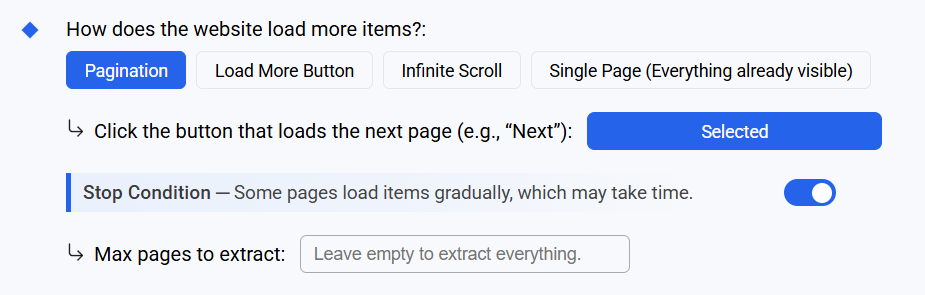
Define how the application should navigate through the website to access all required data.
- Choose the loading mechanism: Pagination buttons, "Load More" triggers, or Infinite Scroll.
- Set stop conditions based on item limits or specific page counts to manage resources effectively.
- Configuration is handled via a simple side panel that stays in sync with the live site view.
Run the Extraction
Initiate the process with a single click. The application shifts into extraction mode to maximize transparency.
- The setup panels collapse, providing an expanded view of the live site.
- Extracted elements are highlighted in real-time as the application processes them.
- Status indicators provide clear progress updates and performance metrics throughout the run.
Review and Clean Your Data
Once extraction is complete, the results are presented in a structured table format for immediate review.
- Identify and remove unwanted symbols or artifacts from the extracted text.
- Adjust formatting and clean columns to ensure data consistency.
- Save your cleaning rules to apply them automatically to future extractions from the same site.
Export Your Data
Move your data into your preferred workflow with flexible export options.
- Export datasets directly to CSV, Excel, or JSON formats.
- TrueExtract imposes no export limits, allowing you to handle large-scale datasets.
- All files are saved locally to your device, maintaining your data's sovereignty.
